Image Recapture Detection
recaptureThe Recapture Detection model evaluates whether a photo is original, or if it is a photo of a printed or displayed image.
Overview
The Recapture Detection model analyzes an image and determines whether it was captured directly from a real-world scene or re-photographed from an existing image such as a screen, printout, magazine or poster.
Recapture (also known as a presentation attack or second-capture attack) is one of the most common techniques used to bypass originality checks, strip provenance signals and impersonate legitimate content.
When to use this model
- Marketplace & listing integrity. Flag sellers uploading photos of products displayed on a monitor, or re-photographed catalog pages, instead of authentic product shots.
- User-generated content originality. Identify images passed off as original that are in fact re-photographed from another source (screens, magazines, posters, printed photos).
- Document & proof-of-identity workflows. Ensure that receipts, invoices, IDs or certificates were captured directly from the physical document, not re-photographed from another display or printout.
- Dataset hygiene. Filter recaptured images out of training sets, stock libraries and user-generated content archives.
- Watermark & provenance evasion. Catch attempts to strip watermarks or C2PA-style signatures by printing or displaying an image and re-photographing it.
When to use something else
- For face-specific spoofing during selfies or identity checks (printed face photos, screen replays, 3D masks), use Face Liveness Detection — it is optimized for that narrower task and returns richer signals.
- For detecting AI-generated or synthetic images, use AI-generated Image Detection. Recapture detection and AI detection are complementary and often combined.
- To detect face swaps, see Deepfake Detection.
Definitions & Examples
What is a recaptured image?
The following types of images are detected as being recaptures:
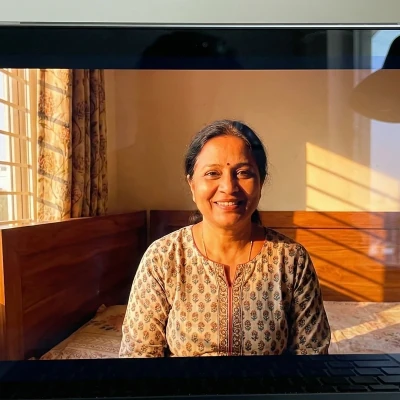
Displayed images
Photos of images displayed on phones, tablets, or monitors. This includes cases where the edge of the screen or monitor is not visible.
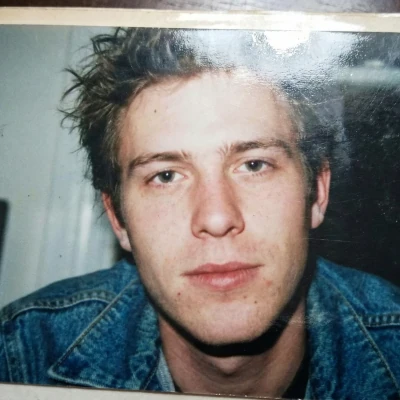
Printed images
Photos of printed images, photos, magazine covers, posters, etc. This includes cases where the edge of the photo/magazine/poster is not visible.
Original images
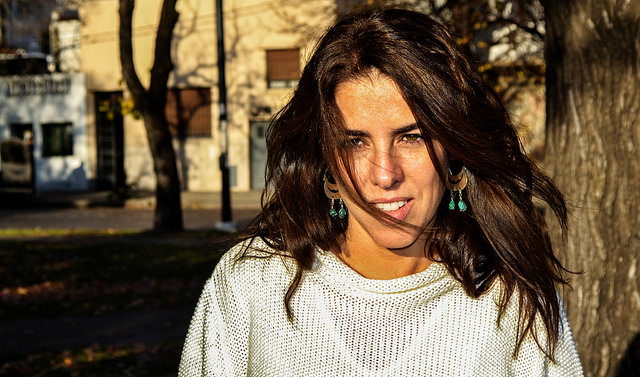
Images that do not fall under the "recapture" category are considered original. This includes:
- Photos where a screen or printed image is visible but is not the primary subject (e.g. a laptop on a desk, a poster on a wall).
- Screenshots captured digitally (no physical re-photographing step).
- Original photos with post-processing edits such as overlays or collages.
- AI-generated images (see the GenAI detection model for this)
How it works
The model looks for the subtle visual artifacts that recapturing an image almost always introduces, including:
- Moiré and aliasing patterns from photographing a pixel grid.
- Screen-door and sub-pixel structure visible at the sensor level.
- Reflections, glare and screen bezels even when cropped out of the main subject.
- Halftone and dithering patterns typical of printed material and magazine pages.
- Paper texture, folding and lighting inconsistencies on printed photos and posters.
- Double-compression and frequency-domain artifacts that persist after re-encoding.
These signals are fused into a single calibrated score between 0 and 1.
Robustness
The model is designed to remain accurate under common real-world transformations, including:
- JPEG re-encoding at moderate-to-high quality settings.
- Resizing down to ~512 px on the shortest edge.
- Mild color adjustments, auto-brightness and auto-contrast.
- EXIF stripping and standard social-platform recompression pipelines.
Best practices
To maximize accuracy, send the image as close to the original as possible. Skip manual resizing or aggressive compression before the API call when feasible, avoid stacking multiple re-encodings (e.g. JPEG → PNG → JPEG).
Code examples
Upload a file or send an image URL, pick your language, and receive a JSON response. Need credentials first? Create a free account →
curl -X POST 'https://api.sightengine.com/1.0/check.json' \
    -F 'media=@/path/to/image.jpg' \
    -F 'models=recapture' \
    -F 'api_user={api_user}' \
    -F 'api_secret={api_secret}'
# this example uses requests
import requests
import json

params = {
  'models': 'recapture',
  'api_user': '{api_user}',
  'api_secret': '{api_secret}'
}
files = {'media': open('/path/to/image.jpg', 'rb')}
r = requests.post('https://api.sightengine.com/1.0/check.json', files=files, data=params)

output = json.loads(r.text)
$params = array(
  'media' => new CurlFile('/path/to/image.jpg'),
  'models' => 'recapture',
  'api_user' => '{api_user}',
  'api_secret' => '{api_secret}',
);

// this example uses cURL
$ch = curl_init('https://api.sightengine.com/1.0/check.json');
curl_setopt($ch, CURLOPT_POST, true);
curl_setopt($ch, CURLOPT_RETURNTRANSFER, true);
curl_setopt($ch, CURLOPT_POSTFIELDS, $params);
$response = curl_exec($ch);
curl_close($ch);

$output = json_decode($response, true);
// this example uses axios and form-data
const axios = require('axios');
const FormData = require('form-data');
const fs = require('fs');

data = new FormData();
data.append('media', fs.createReadStream('/path/to/image.jpg'));
data.append('models', 'recapture');
data.append('api_user', '{api_user}');
data.append('api_secret', '{api_secret}');

axios({
  method: 'post',
  url:'https://api.sightengine.com/1.0/check.json',
  data: data,
  headers: data.getHeaders()
})
.then(function (response) {
  // on success: handle response
  console.log(response.data);
})
.catch(function (error) {
  // handle error
  if (error.response) console.log(error.response.data);
  else console.log(error.message);
});
| Parameter | Type | Description |
| media | file | image to analyze |
| models | string | comma-separated list of models to apply |
| api_user | string | your API user id |
| api_secret | string | your API secret |
API response
The API returns a JSON response with the following structure:
{
  "status": "success",
  "request": {
    "id": "req_1SJJxJjUHnSVWreApx9fF",
    "timestamp": 1693574119.571633,
    "operations": 3
  },
  "recapture": {
    "score": 0.99
  },
  "media": {
    "id": "med_1SJJEFuLqeSedThQjhNoS",
    "uri": "https://sightengine.com/assets/img/examples/example-fac-1000.jpg"
  }
}
Successful Response
Status code: 200, Content-Type: application/json| Field | Type | Description |
| status | string | status of the request, either "success" or "failure" |
| request | object | information about the processed request |
| request.id | string | unique identifier of the request |
| request.timestamp | float | timestamp of the request in Unix time |
| request.operations | integer | number of operations consumed by the request |
| recapture | object | results for the model |
| media | object | information about the media analyzed |
| media.id | string | unique identifier of the media |
| media.uri | string | URI of the media analyzed: either the URL or the filename |
Error
Status codes: 4xx and 5xx. See how error responses are structured.The model returns a recapture object containing a score (recapture.score). This score is a float ranging from 0 to 1; the closer to 1, the more certain the model is of a recaptured image. Scores above 0.5 indicate a likely recapture; tune the threshold to your precision/recall preference.
Frequently asked questions
Does the model detect screenshots as recaptures?
No. A screenshot is captured digitally, without the visual artifacts introduced by re-photographing a physical or displayed image, so it is classified as original. If you also want to filter screenshots, combine this model with Image Type Detection.
Does it work if the screen or paper edges are cropped out?
Yes. The model relies primarily on frequency-domain and texture cues that persist even when the obvious framing signals (bezels, paper edges) are removed from the shot.
Will AI-generated or heavily edited images be flagged?
Not by this model. AI-generated images, filtered photos, collages and overlays are treated as original. If you need to detect AI-generated content, add AI-generated Image Detection to the same API call.
Will the model detect a recaptured image if the recaptured portion only occupies a small part of the image?
No. The model is designed to detect a recapture only when it occupies most or all of the image. If a screen or printout appears in just a small portion of the image, it will not be flagged.
Can I call this model together with other Sightengine models?
Yes. Pass a comma-separated list in the models parameter: models=recapture,genai,nudity-2.1 and the API will return all results in a single response. This is the recommended pattern for production pipelines.
What about screenshots of screenshots, or scanned documents?
Screenshots remain digital captures regardless of how many times they are re-screenshotted, so they are always classified as original. Similarly, scanned documents are not considered recaptures because the scanner digitizes the document directly rather than photographing it through a second optical system.
Can reflections, glare or harsh lighting on an original photo cause a false positive?
The model is trained to distinguish the artifacts specific to recapturing (moiré, sub-pixel structure, halftone patterns) from ordinary reflections and glare that can appear on any photo. Surface reflections on an original image will not trigger a false positive.
Is a photo of a book cover, magazine page or poster considered a recapture?
Yes. Any photograph whose primary subject is a pre-existing printed or displayed image — including book covers, magazine pages and posters — is classified as a recapture. This applies even in legitimate contexts such as flat-lay photography or book reviews. If your use case requires allowing these images, adjust your threshold or add an exception for that content category on your side.